Business Process Modeling: Method, Example, and Tools (2026 Guide)
Mapping a process is easy. Running it afterward is a different job. Here's a simple method, a real commented example, and what happens after the diagram.

Jul 25, 2026
Modeling a business process means describing it precisely enough that everyone understands it the same way: the steps, the decisions, who does what, and what triggers the next step. It's the first rung of any process digitization effort. But a diagram never ran a company. Here's a simple method, a concrete commented example, and — most importantly — what happens once the diagram is done.
Contents
- What is business process modeling?
- How do you model a business process?
- What are the different types of business process?
- A business process modeling example
- What is the best tool for modeling processes?
- What does a business process analyst do?
- From the diagram to the app that runs
- Frequently asked questions
What is business process modeling?
A business process is a sequence of steps that turns an input into a result: an order that becomes a delivery, a quote that becomes a contract, an invoice that becomes a payment. Business process modeling means representing that flow (the steps, the actors, the decisions, the exceptions) in a clear, shared way.
The goal isn't the pretty diagram. It's getting everyone to agree on how the work actually happens, before trying to improve or automate it. A poorly understood process that you computerize is still a bad process — just faster.
How do you model a business process?
In four steps, in this order.
- Map the real flow, not the ideal one. Follow a real request end to end and note every step as it happens today, including the spreadsheets, emails, and phone calls. That's usually where you discover the official process and the real process no longer have much in common.
- Name the actors and the decisions. For each step: who acts, on what information, and which decision branches the flow. A missed decision point is an exception that blows up in your face later.
- Spot the friction and the exceptions. Where does work wait? Where is the same data re-typed twice? Which edge cases break the tidy linear diagram? Exceptions aren't details — they decide whether an automation will hold up.
- Decide what should be automated, and what shouldn't. Not everything belongs on autopilot. A step of human judgment often beats a rigid rule. Good software suggests and flags; it doesn't take the pen out of the team's hand.
One piece of field advice: model with the people who do the work, not only with the people who describe it. The gap between the two accounts is exactly the information you're after.
What are the different types of business process?
Three families are usually distinguished, and the split matters because they aren't steered the same way.
- Core processes (or operational) directly produce the value sold to the customer: taking an order, manufacturing, delivering, invoicing. These suffer most from spreadsheets, and their automation pays back fastest.
- Support processes make the previous ones possible without being visible to the customer: purchasing, hiring, IT, maintenance. Often skipped at modeling time, they are nonetheless the source of a good share of the waiting time.
- Management processes exist to decide and to control: setting objectives, performance reviews, risk management. They consume data produced by the other two families, which is why reliable reporting depends first on clean operational processes.
A single department usually spans all three. Modeling a core process while ignoring the support process that feeds it is the most common way to produce a diagram that looks right and doesn't hold.
A business process modeling example
Take a case we know well: a wine estate's annual pricing. It looks simple from a distance. Once modeled, it looks like this.
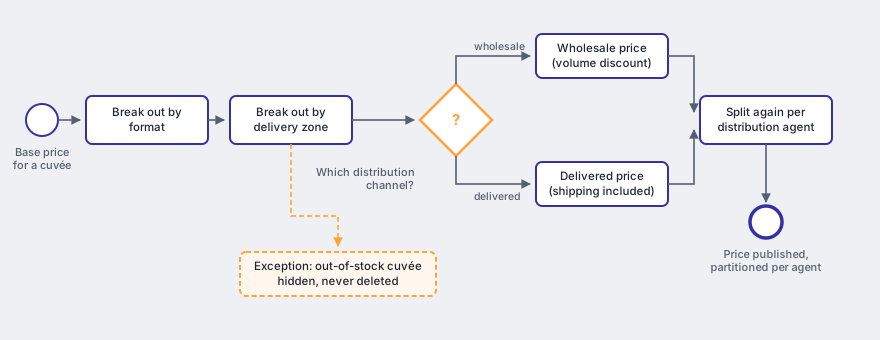
Each cuvée is broken out by format, delivery zone, and channel (wholesale or delivered), then split again per distribution agent, with each agent seeing only their own producers. A decision (does this agent cover this zone?) branches the flow at every node, and an exception (a cuvée that's out of stock) has to be hidden without being deleted.
The diagram says three useful things the spoken description hid. There's a decision gateway mid-flow, so two sets of pricing rules to maintain. There's partitioning at the end of the journey, so an access-rights constraint and not just a layout one. And there's an exception that can't be handled by deleting a row, so a need for history.
On a whiteboard, that process fits on one page. Lived inside a 90-tab Excel workbook, it swallowed weeks every January. The modeling did one thing: it made visible what the spreadsheet hid, so it could finally be replaced. That's exactly what we describe in our case study on that pricing app.
What is the best tool for modeling processes?
The honest answer: the one your team will actually re-read. Most teams start with a process modeling tool (a BPMN app, an online whiteboard, or even Excel) and the choice matters less than the time spent with the right people around the diagram.
BPMN 2.0 does have a real advantage: a standard vocabulary (tasks, gateways, events) that everyone can read, including the engineering team that will implement it afterward. It earns its keep as soon as the process has to be handed over or discussed across several months. For a first exploratory pass, a whiteboard and some photos are enough, and faster.
But the tool matters less than you'd think. A perfect BPMN diagram that stays in a PDF has changed no one's day. The diagram is a way to reach agreement, not a deliverable that, on its own, saves time. The real question isn't "which tool do we draw the process with," but "what's going to run it tomorrow morning."
What does a business process analyst do?
A business process analyst bridges the teams that do the work and the teams that build the tools. In practice: running the workshops, mapping the real flow, flushing out the exceptions nobody volunteers, quantifying the friction (waiting time, double entry, error rate), and proposing a target process along with what should stay manual.
In a large organization that's a full-time role. In a smaller company it's usually carried by whoever knows the business best, with outside help for method and write-up. It's the role we play during the scoping phase, and it has a limit worth stating: an analyst who delivers a diagram and leaves has done half the job. The value of the role comes from it continuing into the tool.
From the diagram to the app that runs
That's where our difference lies. We don't sell a modeling tool. We model the process with you, then build the custom application that actually runs it: a real data model, the business rules in code, the exceptions handled, and an interface where the team works instead of copying cells around.
The diagram says what should happen. The app makes sure it does: it applies the rules, flags the drift, keeps the history, and leaves human judgment where it belongs. That's precisely what we do when we replace a fragile spreadsheet or an aging ERP with custom business software, wired into your existing systems and built around your real data.
One clarification, because it saves disappointment: not every modeled process deserves an application. If the process runs three times a year, fits on one sheet, and nobody complains, leave it alone. Custom development earns its place when the process is frequent, expensive in time, carrying rules you can no longer enforce, or blocking growth.
Frequently asked questions
What is process modeling?
Process modeling means representing how an activity actually unfolds: the steps, the actors, the decisions that branch the flow, and the exceptions. The point isn't the diagram itself but getting everyone to agree on how the work really happens, before trying to improve or automate it.
What is business modeling?
Business modeling is the broad term for representing a company's activity: its processes, but also its data and its business rules. Business process modeling is the part that describes the sequences of steps. In a software project the three go together: a process only runs if the data model and the business rules follow.
What is the difference between BPMN and a plain flowchart?
A flowchart shows boxes and arrows with no imposed vocabulary. BPMN 2.0 is a standard notation: a task, a decision gateway, an event, and a flow each have a precise symbol everyone reads the same way. BPMN is therefore stricter and more verbose. For a first pass a whiteboard is often enough; BPMN earns its keep once the process has to be handed over, discussed over months, or implemented by an engineering team.
How long does it take to model a process?
For a single, well-bounded business process, plan half a day to two days of workshops, plus about as much again to write it up and validate it. What blows the schedule is never the drawing: it's the exceptions nobody mentioned and the disagreements about who decides what, which surface precisely because you're modeling. A process that needs three weeks of mapping is usually several processes badly separated.
Should you model before building custom software?
Yes, but lightly. A modeling pass stops you coding a misunderstanding, and it surfaces the exceptions that will drive the architecture. A fifty-page spec frozen before the first line of code ages badly, though: the real questions appear when the team sees a first screen. Model enough to agree, then move in iterations.
The takeaway
Modeling a business process is essential, but it's only a starting point. The diagram gets you aligned; the app gets you time back. If you've already mapped a process (or it still lives in a spreadsheet no one dares touch), send it over — we'll tell you honestly what's worth automating and what the tool that runs it would look like. Let's talk.
Related: what custom software actually is and when it's worth it, and how to scope the project without a 50-page spec.